

Background #
Outside of work, most of my recent coding has been fairly low-key – mainly small tweaks to my blog, as you’ve probably noticed. For those one-off tasks, I couldn’t really be bothered setting up anything complex, and Continue never quite fit into my workflow. The local LLMs I’d tried before also weren’t particularly impressive at coding – although, to be fair, that might well have been on me.
I was getting tired of copy‑pasting snippets into ChatGPT, and a couple of months ago Qwen3‑Coder was released (I’d previously tested Qwen2.5‑Coder), so I figured it was worth giving things another go.
This time, instead of just throwing small snippets at a model, I wanted to try a more heavyweight workflow and see if better context and tooling would lead to better results. Like any machine learning system – LLMs included, even if they’re more forgiving – the garbage‑in, garbage‑out principle still applies. These models tend to perform best when you don’t overwhelm them with context, but you do give them clear instructions. The problem is that when I just want to release a small feature quickly, my motivation to write long, careful prompts is fairly limited.
So I decided to give Claude Code a try. The decision was helped by the general hype, and by the fact that Ollama released official support for it less than a week ago.
I’m not paying for that! (for now) #
When you use Claude Code, you’re not paying for the software itself – you’re paying for access to Anthropic’s models, which is fair enough. These models are expensive to run, and hosting them yourself comes with a pretty hefty upfront cost.
If you look at the pricing, the cheapest tier is $17 per month, followed by a $100 plan, and then a $200 plan at the top end. The differences come down to usage limits and access to better models. From what I’ve heard (both from people I know and from various posts online), it’s very easy to burn through tokens and hit rate limits. I suspect most people stick to the $17 plan, or maybe the $100 one at a push – which isn’t ideal for my very spiky, irregular coding habits.
Don’t get me wrong: for a company, especially one based in a high cost‑of‑living area, this is basically pocket change when you consider the productivity gains. For me, though, coding time is unevenly spread across the week, and I can’t really justify spending $100+ every month on this.
Luckily, I’ve got a fairly decent setup at home, so running local LLMs is a realistic option.
Managing expectations #
It’s worth saying up front that the LLMs you can realistically run on a high‑end consumer PC today would have absolutely blown people’s minds three or four years ago. That said, models that require full data‑centre‑scale infrastructure are still superior but small models can still deliver value, depending on your needs.
If you’re experimenting with local LLMs, keep in mind that they won’t consistently match the quality of Anthropic’s models (Sonnet, Haiku, Opus), OpenAI’s offerings (GPT‑5, GPT‑4o, etc.), or even some of the massive open models like Qwen3‑Coder’s 480B variant, which is around 290 GB.
To put that into perspective: most laptops and PCs have 8–16 GB of RAM. Gaming rigs and developer machines might sit closer to 32–64 GB. Loading a large model entirely into system RAM is technically possible, but slow – ideally you want to run it on a GPU. One of the best consumer GPUs right now is the RTX 5090 with 32 GB of VRAM, and unsurprisingly, it’s not cheap.
Last weekend I ran into an issue while updating Ollama and OpenWebUI, and as part of that process I also tested Qwen3‑VL:32B. The results made me a bit sceptical, which definitely lowered my expectations for this experiment.
I’ll walk through the setup steps next, but if you can’t be bothered with all of that, feel free to jump straight to the test flight section.
The setup #
In the next few sections I’ll give a quick walkthrough of how to set up Claude Code with a local LLM. I’m on Linux (Manjaro), so things might look slightly different on Windows. macOS users should be fine.
Ollama: installation, usage and configuration #
The first thing you’ll need is a model manager. I’ve been using Ollama for about a year now and I’m still very happy with it, so this guide is based on that – although there are a few alternatives out there.
To install Ollama, head to: https://ollama.com/download.
Once it’s installed, you can check everything’s working by downloading and running Qwen3‑Coder. You’ll be able to interact with it directly from your terminal:
ollama run qwen3-coder:30b
If that works, you’ll also want to increase Ollama’s context length. With the default 4K tokens, I immediately ran into errors.
- Create or edit the systemd override:
sudo systemctl edit ollama
- Add the following:
[Service]
Environment="OLLAMA_CONTEXT_LENGTH=32000"
If you’ve got enough VRAM to spare, it might be worth increasing this further – the model supports up to 256K. On my GPU, it uses about 22.5 GB of VRAM when idle.
- Save and exit, then reload systemd and restart Ollama:
sudo systemctl daemon-reexec
sudo systemctl restart ollama
If you list running models now with ollama ps, you should see the higher context limit:
[/in/juhaszgergely]$ ollama ps
NAME               ID              SIZE     PROCESSOR    CONTEXT    UNTIL
qwen3-coder:30b    06c1097efce0    21 GB    100% GPU     32000      4 minutes from now
That’s all you need to do on the Ollama side to prepare it for Claude Code.
Claude Code #
CLI #
There’s an official Ollama guide for setting up the Claude Code CLI. I’ll repeat the steps here for convenience (and in case the docs disappear one day), but I’ll also cover an option - suggested in the docs - in the VS Code section.
Install Claude Code:
curl -fsSL https://claude.ai/install.sh | bash
^ As a general rule, don’t blindly trust random blogs on the internet (including mine) when running scripts. Here’s the official quickstart guide for reference.
If you run Claude Code now, it’ll try to connect to Anthropic’s servers. Without an account, that obviously won’t work.
- Set the required environment variables:
export ANTHROPIC_AUTH_TOKEN=ollama
export ANTHROPIC_BASE_URL=http://localhost:11434
- Run Claude Code with the Ollama model:
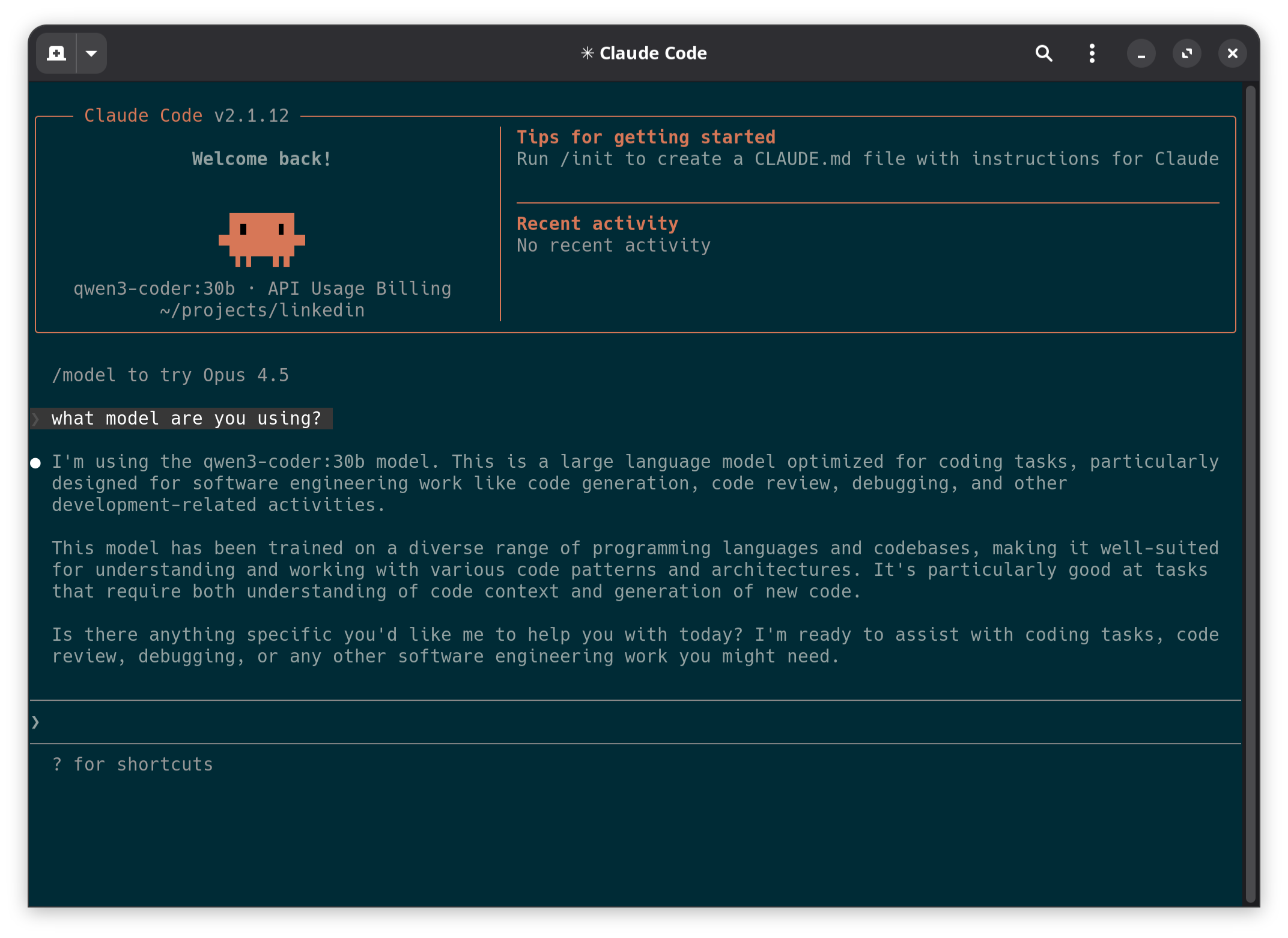
claude --model qwen3-coder:30b
At this point, it should be up and running. I’d recommend playing around with it a bit and enjoying the magic 🙂
VS Code extension #
A lot of people prefer working inside an editor or IDE, so next up is the VS Code extension.
The interface is very similar to the CLI, just a bit more comfortable. You could simply run the Claude Code CLI inside VS Code’s built‑in terminal, and that works fine. The extension just adds a few nice quality‑of‑life improvements, which is why I prefer it.
One thing you’ll want to avoid is having different configuration for the CLI and the extension. The official docs recommend using ~/.claude/settings.json for shared configuration. In my case the file was empty, so after adding what I needed it looks like this:
{
  "env": {
    "ANTHROPIC_AUTH_TOKEN": "ollama",
    "ANTHROPIC_BASE_URL": "http://localhost:11434"
  },
  "model": "qwen3-coder:30b"
}
Next, install the official VS Code extension published by Anthropic.
The final step is to disable the login prompt and explicitly select the model in VSCode’s settings.json. You’ll probably already have plenty of other settings in this file, so just add these two at the bottom:
{
  "claudeCode.disableLoginPrompt": true,
  "claudeCode.selectedModel": "qwen3-coder:30b"
}
Without explicitly setting the model here - despite being set in ~/.claude/settings.json - Claude will keep trying to use Anthropic’s default model. If you see an error like this, that’s likely the cause:
API Error: 404
{
    "type":"error",
    "error":
    {
        "type":"not_found_error",
        "message":"model 'claude-sonnet-4-5-20250929' not found"
    },
    "request_id":""
}
Test flight #
Preparation #
To see whether Qwen3-Coder was actually usable, I did a quick test run. I wanted a small, simple project that would be easy to debug if something went wrong, but still complex enough to expose obvious issues.
I thought about what would be a good test project. I remembered that a few weeks ago we’d realised we’d stopped watching The Mandalorian at the end of season 2. We are rewatching it from the beginning before we start season 3, as we already forgot what was covered. Long-story short, I’ve been watching The Mandalorian recently so what is a better test than helping Din Djarin (aka The Mandalorian) find some new work with a vibe-coded website?
I played around with Claude a bit, but like any tool, you need to learn the basics to be efficient. I came across this YouTube video, which covers the fundamentals and offers some practical tips:
Action #
Following the video’s suggestions, I used Claude in planning mode. This means it first produces a high-level plan, including requirements it writes for itself.
I also borrowed a few ideas from the video and used the following prompt:
Make a single page website to promote the services of Din Djarin aka The Mandalorian (from the Star Wars universe).
- the website is just a fun project, but make it look really professional
- the descriptions on the website should have references to the Star Wars universe
- use tailwind CSS, and only native javascript

Ask me questions to clarify the product requirements, technical requirements, engineering principles, and hard constraints.
As you can see, the prompt explicitly asks for clarifying questions. Given how small and loosely defined the task was, it only came back with two questions. Claude Code’s interface makes this especially nice, as you can just click responses instead of typing everything out:
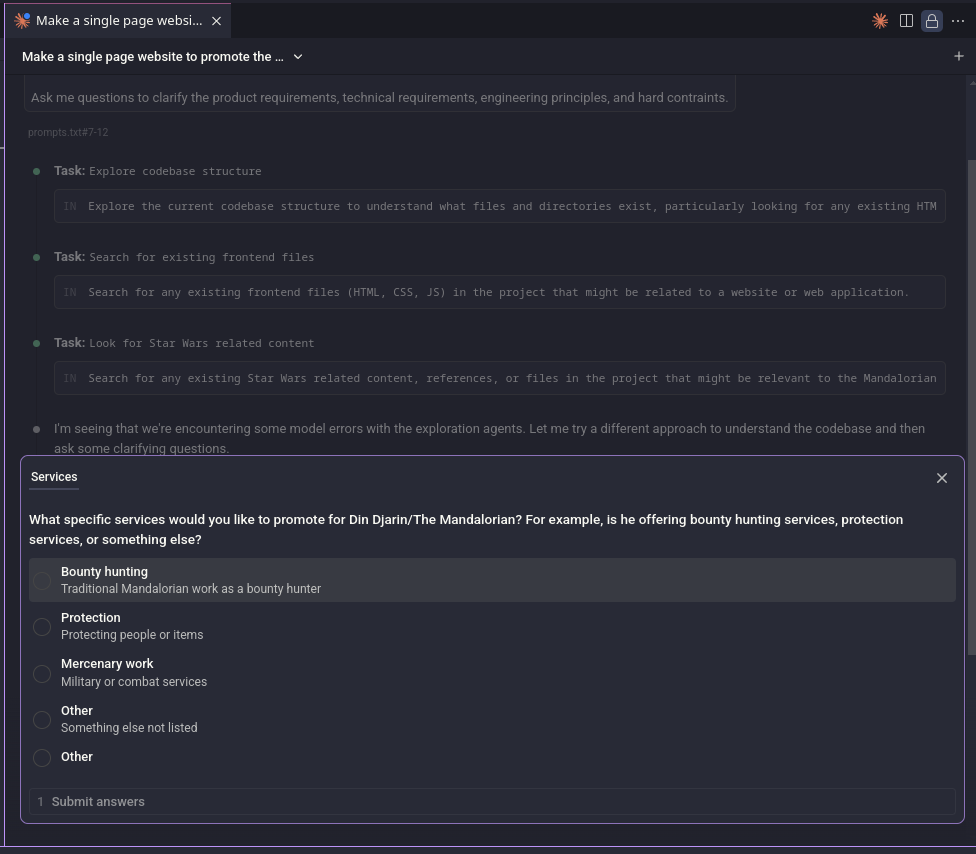
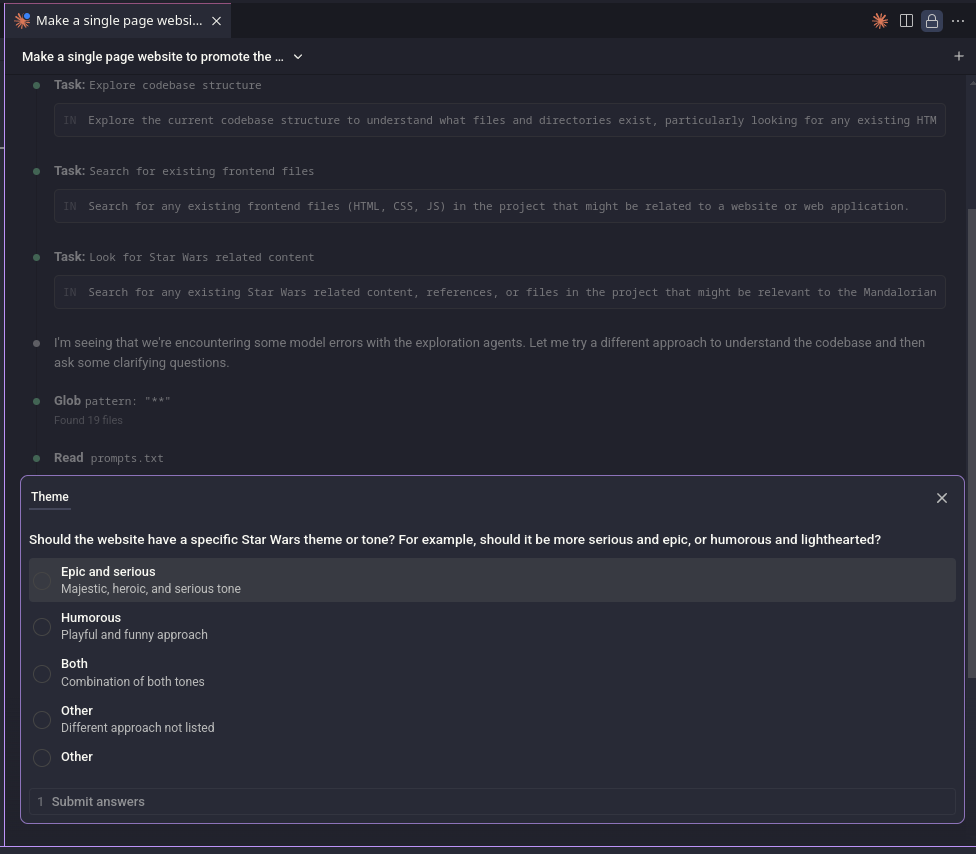
It produced a perfectly reasonable plan, which you can check out here. I accepted it and let Claude do its thing.
Results #
Honestly, I think the end result looks great. It would have taken me longer to build this by hand than it did to set everything up and let Claude Code generate it. Even as a starting template that you then customise, this already feels like a big productivity boost.
The only real issue was with the icon for “Mercenary Work”, it wasn’t showing up. Claude picked the swords icon from Font Awesome. I described the bug and it tried to fix it, but I think it ran into an endless token-generation loop – something I’ve seen before. I’m not sure whether that’s an Ollama issue or a model quirk, but stopping it is just a click.
After a few attempts, it still couldn’t figure out the problem. I checked manually and realised the swords icon isn’t available in the free tier. I suggested replacing it with another icon, and Claude made a perfectly sensible choice.
After all that build-up, you can see the outcome for yourself:
I’m interested in Din Djarin’s services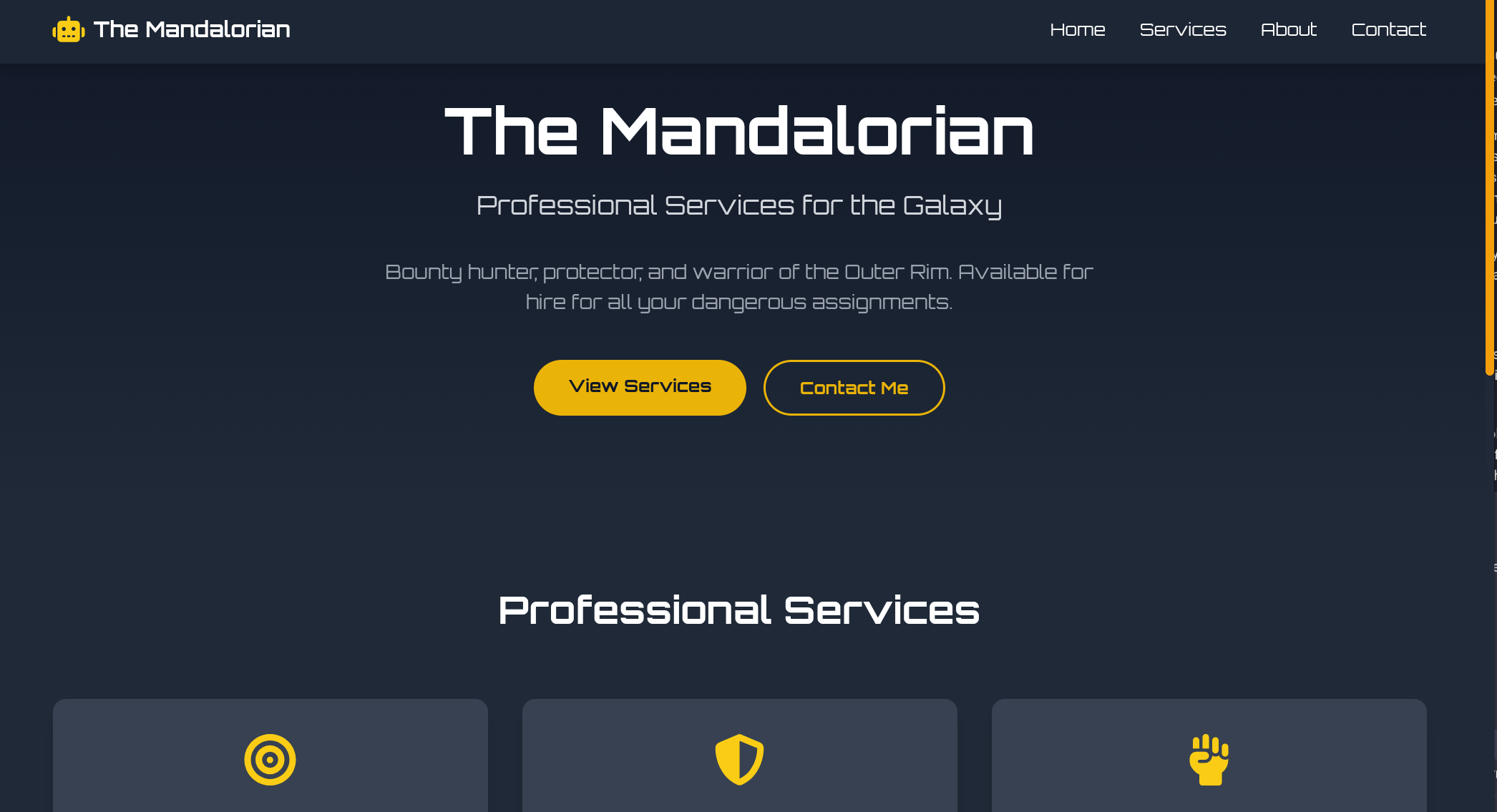
Next steps #
I’ll definitely be exploring Claude Code further. There’s a lot more to dig into, plenty of tips and tricks to learn, and lots of room to experiment. From this first run, Qwen3-Coder feel genuinely useful – though I still need to test this setup on a real-world project.
I’ve also started working through Net Ninja’s Claude Code tutorial series, which they published a few months ago:
Sounds like a pretty fun weekend plan to me 🙂